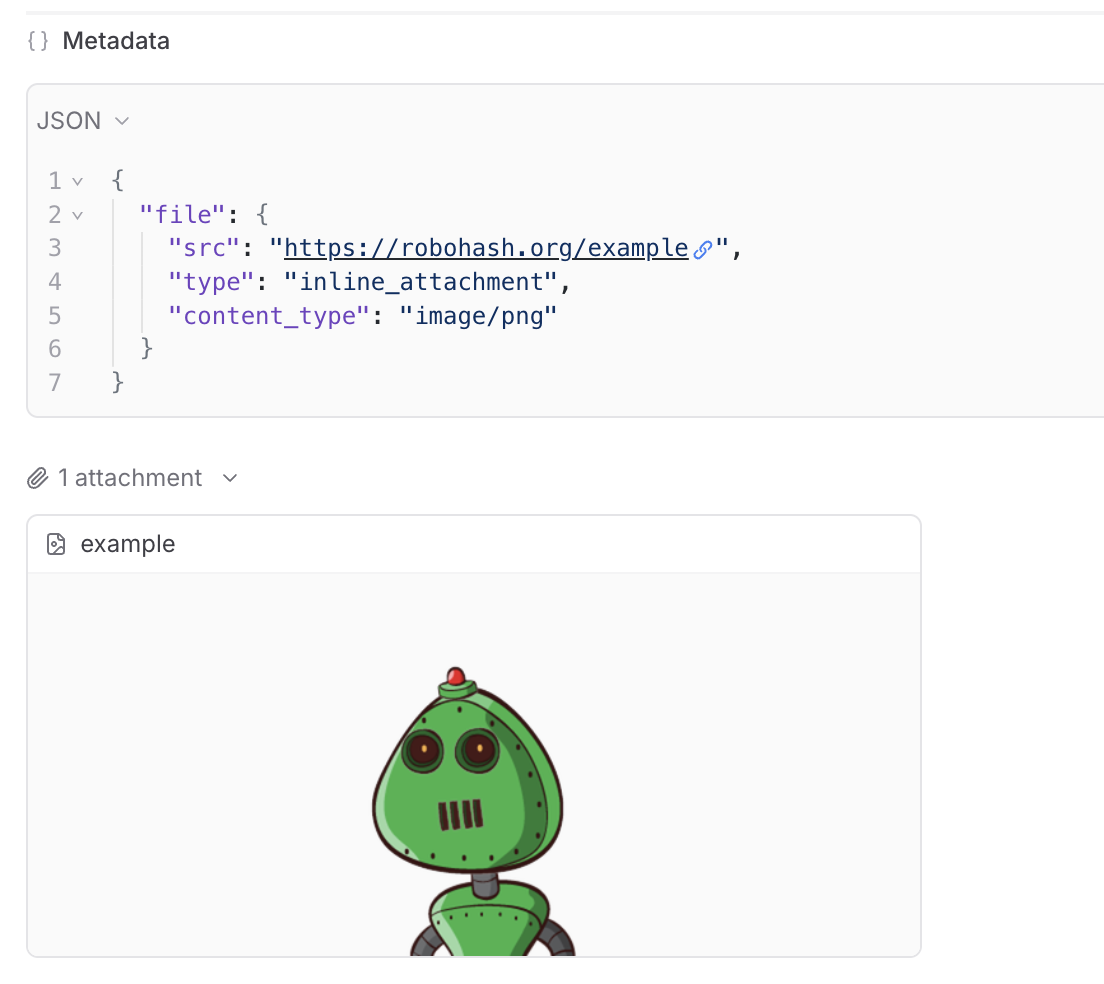
 ## Viewing attachments
You can preview most images, audio files, videos, or PDFs in the Braintrust UI. You can also download any file to view it locally.
We provide built-in support to preview attachments directly in playground input cells and traces.
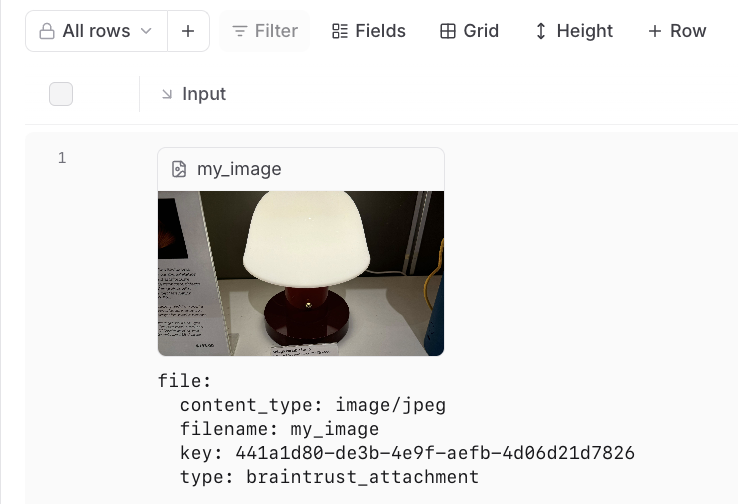
In the playground, you can preview attachments in an inline embedded view for easy visual verification during experimentation:
## Viewing attachments
You can preview most images, audio files, videos, or PDFs in the Braintrust UI. You can also download any file to view it locally.
We provide built-in support to preview attachments directly in playground input cells and traces.
In the playground, you can preview attachments in an inline embedded view for easy visual verification during experimentation:
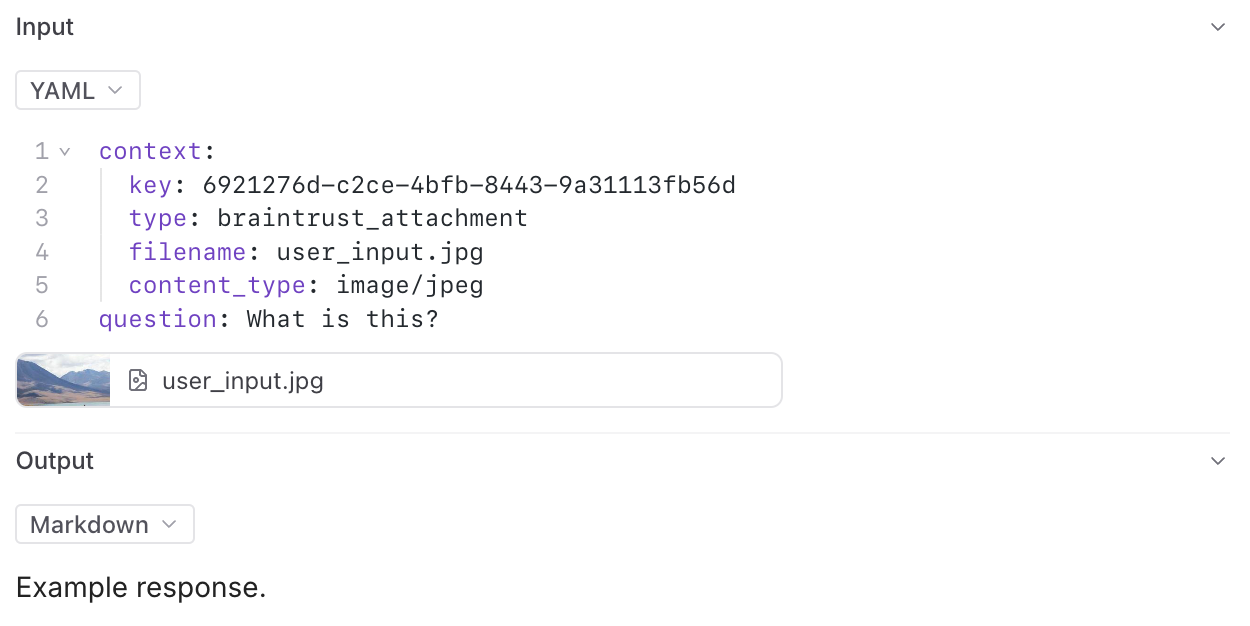
 In the trace pane, attachments appear as an additional list under the data viewer:
 ---
file: ./content/docs/guides/datasets.mdx
meta: {
"title": "Datasets"
}
# Datasets
Datasets allow you to collect data from production, staging, evaluations, and even manually, and then
use that data to run evaluations and track improvements over time.
For example, you can use Datasets to:
* Store evaluation test cases for your eval script instead of managing large JSONL or CSV files
* Log all production generations to assess quality manually or using model graded evals
* Store user reviewed (
---
file: ./content/docs/guides/datasets.mdx
meta: {
"title": "Datasets"
}
# Datasets
Datasets allow you to collect data from production, staging, evaluations, and even manually, and then
use that data to run evaluations and track improvements over time.
For example, you can use Datasets to:
* Store evaluation test cases for your eval script instead of managing large JSONL or CSV files
* Log all production generations to assess quality manually or using model graded evals
* Store user reviewed (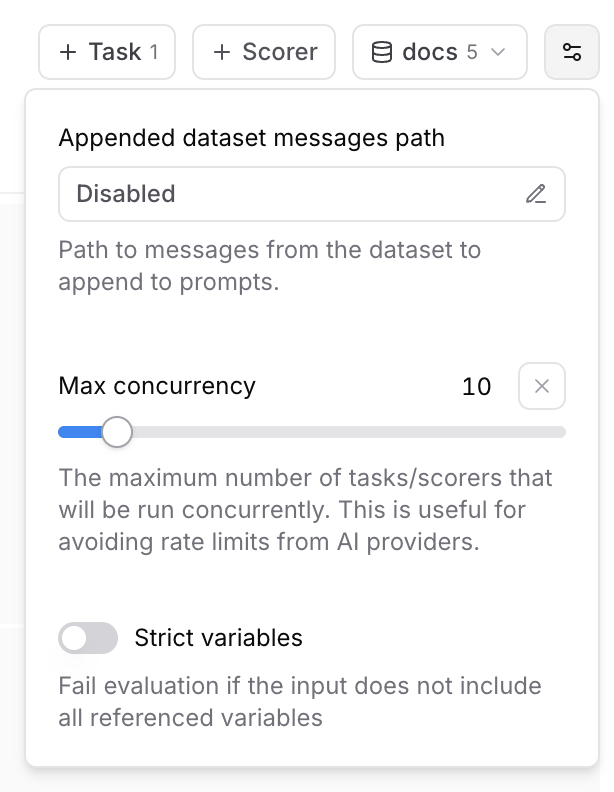 ### Max concurrency
The maximum number of tasks/scorers that will be run concurrently in the playground. This is useful for avoiding rate limits (429 - Too many requests) from AI providers.
### Strict variables
When this option is enabled, evaluations will fail if the dataset row does not include all of the variables referenced in prompts.
## Collaboration
Playgrounds are designed for collaboration and automatically synchronize in real-time.
To share a playground, copy the URL and send it to your collaborators. Your collaborators
must be members of your organization to view the playground. You can invite users from the settings page.
## Reasoning
### Max concurrency
The maximum number of tasks/scorers that will be run concurrently in the playground. This is useful for avoiding rate limits (429 - Too many requests) from AI providers.
### Strict variables
When this option is enabled, evaluations will fail if the dataset row does not include all of the variables referenced in prompts.
## Collaboration
Playgrounds are designed for collaboration and automatically synchronize in real-time.
To share a playground, copy the URL and send it to your collaborators. Your collaborators
must be members of your organization to view the playground. You can invite users from the settings page.
## Reasoning
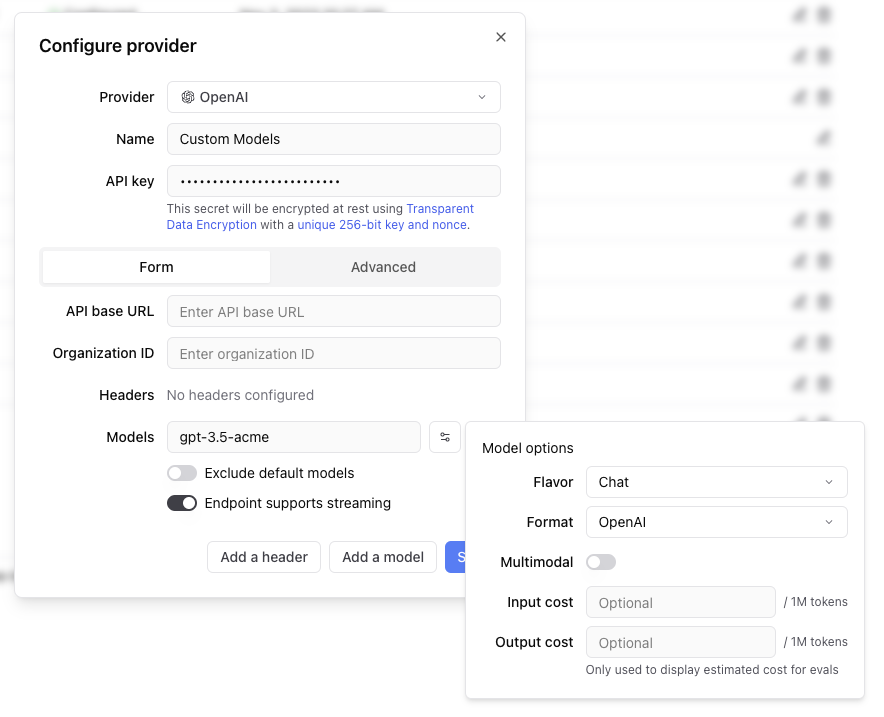 Any headers you add to the configuration will be passed through in the request to the custom endpoint.
The values of the headers can also be templated using Mustache syntax.
Currently, the supported template variables are `{{email}}` and `{{model}}`.
which will be replaced with the email of the user whom the Braintrust API key belongs to and the model name, respectively.
If the endpoint is non-streaming, set the `Endpoint supports streaming` flag to false. The proxy will
convert the response to streaming format, allowing the models to work in the playground.
Each custom model must have a flavor (`chat` or `completion`) and format (`openai`, `anthropic`, `google`, `window` or `js`). Additionally, they can
optionally have a boolean flag if the model is multimodal and an input cost and output cost, which will only be used to calculate and display estimated
prices for experiment runs.
#### Specifying an org
If you are part of multiple organizations, you can specify which organization to use by passing the `x-bt-org-name`
header in the SDK:
Any headers you add to the configuration will be passed through in the request to the custom endpoint.
The values of the headers can also be templated using Mustache syntax.
Currently, the supported template variables are `{{email}}` and `{{model}}`.
which will be replaced with the email of the user whom the Braintrust API key belongs to and the model name, respectively.
If the endpoint is non-streaming, set the `Endpoint supports streaming` flag to false. The proxy will
convert the response to streaming format, allowing the models to work in the playground.
Each custom model must have a flavor (`chat` or `completion`) and format (`openai`, `anthropic`, `google`, `window` or `js`). Additionally, they can
optionally have a boolean flag if the model is multimodal and an input cost and output cost, which will only be used to calculate and display estimated
prices for experiment runs.
#### Specifying an org
If you are part of multiple organizations, you can specify which organization to use by passing the `x-bt-org-name`
header in the SDK:
URL String | Required. Your Azure OpenAI service endpoint URL in the format `https://{resource-name}.openai.azure.com`. [Documentation](https://docs.microsoft.com/en-us/azure/cognitive-services/openai/reference#rest-api-versioning) | | **Authentication type**
`api_key` \| `entra_api` | Optional. Choose between API key or Entra API authentication. Default is `api_key`. [Documentation](https://docs.microsoft.com/en-us/azure/cognitive-services/openai/reference#authentication) | | **API version**
String | Optional. The API version to use for requests. Default is `2023-07-01-preview`. [Documentation](https://docs.microsoft.com/en-us/azure/cognitive-services/openai/reference#rest-api-versioning) | | **Deployment**
String | Optional. The deployment name for your model (if using named deployments). [Documentation](https://docs.microsoft.com/en-us/azure/cognitive-services/openai/how-to/create-resource) | | **No named deployment**
Boolean | Optional. Whether to skip using deployment names in the request path. Default is `false`. If true, the deployment name will not be used in the request path. | ## Models Azure OpenAI provides access to OpenAI models including: * GPT-4o `gpt-4o` * GPT-4 `gpt-4` * GPT-3.5 Turbo `gpt-35-turbo` * DALL-E 3 `dall-e-3` * Whisper `whisper` **Note**: Model availability varies by region and requires deployment through the Azure portal. ## Setup requirements 1. **Azure OpenAI Resource**: Create an Azure OpenAI service resource in the Azure portal 2. **Model Deployment**: Deploy the models you want to use through the Azure portal 3. **API Access**: Obtain your API key or configure Entra ID authentication 4. **Regional Availability**: Ensure your chosen region supports the models you need ## Additional resources * [Azure OpenAI Documentation](https://docs.microsoft.com/en-us/azure/cognitive-services/openai/) * [Model Availability](https://docs.microsoft.com/en-us/azure/cognitive-services/openai/concepts/models) * [Azure OpenAI Pricing](https://azure.microsoft.com/en-us/pricing/details/cognitive-services/openai-service/) * [Quickstart Guide](https://docs.microsoft.com/en-us/azure/cognitive-services/openai/quickstart) --- file: ./content/docs/providers/baseten.mdx meta: { "title": "Baseten", "description": "Baseten model provider configuration and integration guide" } # Baseten Baseten provides scalable infrastructure for deploying and serving machine learning models, including language models and custom AI applications. Braintrust integrates seamlessly with Baseten through direct API access, wrapper functions for automatic tracing, and proxy support. ## Setup To use Baseten models, configure your Baseten API key in Braintrust. 1. Get a Baseten API key from [Baseten Console](https://app.baseten.co/settings/api-keys) 2. Add the Baseten API key to your organization's [AI providers](/app/settings/secrets) 3. Set the Baseten API key and your Braintrust API key as environment variables ```bash title=".env" BASETEN_API_KEY=
String | Required. The AWS region where your Bedrock models are hosted. [Documentation](https://docs.aws.amazon.com/AWSEC2/latest/UserGuide/using-regions-availability-zones.html) | | **Access key**
String | Required. Your AWS access key ID for authentication. [Documentation](https://docs.aws.amazon.com/IAM/latest/UserGuide/id_credentials_access-keys.html) | | **Secret**
String | Required. Your AWS secret access key (entered separately in the secret field). [Documentation](https://docs.aws.amazon.com/IAM/latest/UserGuide/id_credentials_access-keys.html) | | **Session token**
String | Optional. Temporary session token for AWS STS (Security Token Service) authentication. [Documentation](https://docs.aws.amazon.com/IAM/latest/UserGuide/id_credentials_temp_use-resources.html) | | **API base**
URL String | Optional. Custom API endpoint URL if using a different Bedrock endpoint. Default uses AWS Bedrock default endpoints. | ## Models Popular AWS Bedrock models include: * Claude 3.5 Sonnet `anthropic.claude-3-5-sonnet-20241022-v2:0` * Claude 3 Haiku `anthropic.claude-3-haiku-20240307-v1:0` * Llama 3.1 70B `meta.llama3-1-70b-instruct-v1:0` * Titan Text `amazon.titan-text-express-v1` ## Additional resources * [AWS Bedrock Documentation](https://docs.aws.amazon.com/bedrock/) * [Bedrock Model IDs](https://docs.aws.amazon.com/bedrock/latest/userguide/model-ids.html) * [Bedrock Pricing](https://aws.amazon.com/bedrock/pricing/) --- file: ./content/docs/providers/cerebras.mdx meta: { "title": "Cerebras", "description": "Cerebras model provider configuration and integration guide" } # Cerebras Cerebras provides ultra-fast inference for large language models using specialized hardware architecture. Braintrust integrates seamlessly with Cerebras through direct API access, wrapper functions for automatic tracing, and proxy support. ## Setup To use Cerebras models, configure your Cerebras API key in Braintrust: 1. Get a Cerebras API key from [Cerebras Cloud](https://cloud.cerebras.ai/) 2. Add the Cerebras API key to your organization's [AI providers](/app/settings/secrets) 3. Set the Cerebras API key and your Braintrust API key as environment variables ```bash title=".env" CEREBRAS_API_KEY=
### Configuration options
Specify the following for your custom provider.
* **Provider name**: A unique name for your custom provider
* **Model name**: The name of your custom model (e.g., `gpt-3.5-acme`, `my-custom-llama`)
* **Endpoint URL**: The API endpoint for your custom model
* **Format**: The API format (`openai`, `anthropic`, `google`, `window`, or `js`)
* **Flavor**: Whether it's a `chat` or `completion` model (default: `chat`)
* **Headers**: Any custom headers required for authentication or configuration
### Custom headers and templating
Any headers you add to the configuration are passed through in the request to the custom endpoint. The values of the headers can be templated using Mustache syntax with these supported variables:
* `{{email}}`: Email of the user associated with the Braintrust API key
* `{{model}}`: The model name being requested
Example header configuration:
```
Authorization: Bearer {{api_key}}
X-User-Email: {{email}}
X-Model: {{model}}
```
### Streaming support
If your endpoint doesn't support streaming natively, set the "Endpoint supports streaming" flag to false. Braintrust will automatically convert the response to streaming format, allowing your models to work in the playground and other streaming contexts.
### Model metadata
You can optionally specify:
* **Multimodal**: Whether the model supports multimodal inputs
* **Input cost**: Cost per million input tokens (for experiment cost estimation)
* **Output cost**: Cost per million output tokens (for experiment cost estimation)
URL String | Required. Your Databricks workspace URL in the format `https://{workspace-name}.cloud.databricks.com`. [Documentation](https://docs.databricks.com/dev-tools/api/latest/index.html#workspace-instance-names) | | **Authentication type**
`pat` \| `service_principal_oauth` | Optional. Choose between personal access token or service principal OAuth. Default is `pat`. [Documentation](https://docs.databricks.com/dev-tools/api/latest/authentication.html) | | **Secret**
String | Required if using `pat` auth type. Your Databricks personal access token. [Documentation](https://docs.databricks.com/dev-tools/api/latest/authentication.html#token-management) | | **Client ID**
String | Required if using `service_principal_oauth` auth type. Client ID for service principal authentication. [Documentation](https://docs.databricks.com/dev-tools/api/latest/oauth.html) | | **Client Secret**
String | Required if using `service_principal_oauth` auth type. Client secret for service principal authentication. [Documentation](https://docs.databricks.com/dev-tools/api/latest/oauth.html) | ## Models Databricks provides access to several foundation models through Model Serving. ### Foundation models * Meta Llama 3.1 70B Instruct * Meta Llama 3.1 8B Instruct * Mistral 7B Instruct * Mixtral 8x7B Instruct * MPT-7B Instruct ### Custom models Deploy your own fine-tuned models through Databricks Model Serving. ## Setup requirements 1. **Databricks Workspace**: Ensure you have access to a Databricks workspace 2. **Model Serving**: Enable Model Serving in your workspace 3. **Authentication**: Set up either PAT or service principal authentication 4. **Model Endpoints**: Deploy the models you want to use as serving endpoints ## Endpoint configuration Configure the following for model endpoints in Databricks. 1. **Serving Endpoint Name**: Use this as the model name in Braintrust 2. **Endpoint URL**: Automatically constructed from your workspace URL 3. **Authentication**: Uses the configured authentication method ## Additional resources * [Databricks Model Serving Documentation](https://docs.databricks.com/machine-learning/model-serving/index.html) * [Foundation Model APIs](https://docs.databricks.com/machine-learning/foundation-models/index.html) * [Authentication Guide](https://docs.databricks.com/dev-tools/api/latest/authentication.html) * [Model Serving Pricing](https://databricks.com/product/pricing/model-serving) --- file: ./content/docs/providers/fireworks.mdx meta: { "title": "Fireworks", "description": "Fireworks AI model provider configuration and integration guide" } # Fireworks Fireworks AI provides fast inference for open-source language models including Llama, Mixtral, Code Llama, and other state-of-the-art models. Braintrust integrates seamlessly with Fireworks through direct API access, wrapper functions for automatic tracing, and proxy support. ## Setup To use Fireworks models, configure your Fireworks API key in Braintrust. 1. Get a Fireworks API key from [Fireworks AI Console](https://fireworks.ai/account/api-keys) 2. Add the Fireworks API key to your organization's [AI providers](/app/settings/secrets) 3. Set the Fireworks API key and your Braintrust API key as environment variables ```bash title=".env" FIREWORKS_API_KEY=
String | Required. Your [Google Cloud Project ID](https://cloud.google.com/resource-manager/docs/creating-managing-projects) where Vertex AI is enabled. | | **Authentication type**
`access_token` \| `service_account_key` | Required. Choose between access token or service account key authentication. [Documentation](https://cloud.google.com/vertex-ai/docs/authentication) | | **Secret**
JSON String | Required if using `service_account_key` auth type. The service account key JSON content. [Documentation](https://cloud.google.com/iam/docs/creating-managing-service-account-keys) | | **API base**
URL String | Optional. Custom API endpoint URL if using a different Vertex AI endpoint. [Documentation](https://cloud.google.com/vertex-ai/docs/reference/rest#service-endpoint). Default is `https://{location}-aiplatform.googleapis.com`. | ## Models Popular Vertex AI models include: * Gemini 1.5 Pro (`gemini-1.5-pro`) * Gemini 1.5 Flash (`gemini-1.5-flash`) * PaLM 2 (`text-bison`) * Codey (`code-bison`) ## Setup requirements 1. **Enable Vertex AI API**: Ensure the Vertex AI API is enabled in your Google Cloud project 2. **Service account permissions**: If using service account authentication, ensure the service account has the `AI Platform Developer` role 3. **Quotas**: Check your project's Vertex AI quotas and limits ## Additional resources * [Vertex AI Documentation](https://cloud.google.com/vertex-ai/docs) * [Vertex AI Model Garden](https://cloud.google.com/vertex-ai/docs/model-garden/explore-models) * [Vertex AI Pricing](https://cloud.google.com/vertex-ai/pricing) * [Authentication Guide](https://cloud.google.com/vertex-ai/docs/authentication) --- file: ./content/docs/providers/groq.mdx meta: { "title": "Groq", "description": "Groq model provider configuration and integration guide" } # Groq Groq provides ultra-fast inference for open-source language models including Llama, Mixtral, and Gemma models. Braintrust integrates seamlessly with Groq through direct API access, wrapper functions for automatic tracing, and proxy support. ## Setup To use Groq models, configure your Groq API key in Braintrust. 1. Get a Groq API key from [Groq Console](https://console.groq.com/keys) 2. Add the Groq API key to your organization's [AI providers](/app/settings/secrets) 3. Set the Groq API key and your Braintrust API key as environment variables ```bash title=".env" GROQ_API_KEY=
### Iterative experimentation
Rapidly prototype with different prompts
and models in the [playground](/docs/guides/playground)
and models in the [playground](/docs/guides/playground)
### Performance insights
Built-in tools to [evaluate](/docs/guides/evals) how models and prompts are performing in production, and dig into specific examples
### Real-time monitoring
[Log](/docs/guides/logging), monitor, and take action on real-world interactions with robust and flexible monitoring
### Data management
[Manage](/docs/guides/datasets) and [review](/docs/guides/human-review) data to store and version
your test sets centrally
your test sets centrally
Reset Password
```
Reset Password
```

John Doe
Lorem ipsum dolor sit amet, consectetur adipiscing elit. Nulla ut turpis
hendrerit, ullamcorper velit in, iaculis arcu.
500
Followers
250
Following
1000
Posts
```